# Figure and Editable Caption
**URL:** https://discuss.prosemirror.net/t/figure-and-editable-caption/462
**Category:** Uncategorized
**Created:** [October 27, 2016, 8:08pm UTC](https://discuss.prosemirror.net/t/figure-and-editable-caption/462 "2016-10-27T20:08:01Z")
**Posts on this page:** 13
**Page:** 1
### Author:  [@ThariqS](https://discuss.prosemirror.net/u/ThariqS)
#### Post date: [October 27, 2016, 8:08pm UTC](https://discuss.prosemirror.net/t/figure-and-editable-caption/462/1 "2016-10-27T20:08:02Z")
This question has been asked a few times before but I haven’t seen a definitive answer.
What’s the best way to do an editable caption inside an element (like an image or figure) in terms of the schema and dom structure?
---
### Author:  [@rsaccon](https://discuss.prosemirror.net/u/rsaccon)
#### Post date: [October 28, 2016, 2:22am UTC](https://discuss.prosemirror.net/t/figure-and-editable-caption/462/2 "2016-10-28T02:22:36Z")
I experimented with that kind of thing and here is how far I got:
if you define the figure in the schema as block, all goes (mostly) as expected, at the dom structure just put image and `figcaption` inside a `figure` dom element and you will be able to edit the caption. What did not work out of the box for me, was the ability to select the figure node, when clicking anywhere inside the figure, but outside the `figcaption` (so I did some ugly hack processing the raw event to work around).
if you define the figure as inline, then all kind of unexpected things will happen, @marijn mentioned some months ago that he hasn’t yet finalized / smoothed out the code related to inline non-leaf nodes
---
### Author:  [@ThariqS](https://discuss.prosemirror.net/u/ThariqS)
#### Post date: [October 28, 2016, 3:53am UTC](https://discuss.prosemirror.net/t/figure-and-editable-caption/462/3 "2016-10-28T03:53:24Z")
Thanks, that helps a lot! Do you think you could post how that related part of your schema looks like?
---
### Author:  [@rsaccon](https://discuss.prosemirror.net/u/rsaccon)
#### Post date: [October 28, 2016, 12:24pm UTC](https://discuss.prosemirror.net/t/figure-and-editable-caption/462/4 "2016-10-28T12:24:48Z")
Sure, here are the relevant parts:
```
figure: {
content: "text<_>*",
group: "block",
attrs: {
// ....
// non-relevant
// ....
},
draggable: true,
selectable: true,
parseDOM: [{tag: "figure", getAttrs(dom) {
// ....
// non-relevant
// ....
}}],
toDOM(node) {
// ....
// create myImageAsReactContainer and others
// ....
return ['figure', {
class: myClass,
style: myStyle,
// more attributes
}, myImageAsReactContainer, ['figcaption', {}, 0]]
}
},
```
What issues did you run into ?
---
### Author:  [@marijn](https://discuss.prosemirror.net/u/marijn)
#### Post date: [October 28, 2016, 12:57pm UTC](https://discuss.prosemirror.net/t/figure-and-editable-caption/462/5 "2016-10-28T12:57:39Z")
Here’s another, possibly more complete example doing something similar.
```javascript
const imageNodeDesc = {
figure: {
attrs: {src: {}},
content: "inline<_>*",
parseDOM: [{
tag: "figure",
contentElement: "figcaption", // Helps the parser figure out where the child nodes are
getAttrs(dom) {
let img = dom.querySelector("img")
return {src: img && img.parentNode == dom ? img.src : "default_image.jpg"}
}
}],
toDOM(node) {
return ["figure", ["img", {src: node.attrs.src}], ["figcaption", 0]]
},
draggable: true,
group: "block",
}
}
```
To cause the node to be selected on click, even though it isn’t a leaf node, you could use the [`handleClickOn`](http://prosemirror.net/ref.html#view.EditorProps.handleClickOn) prop, passing something like…
```javascript
function handleFigureClick(view, pos, node, posBefore) {
if (node.type.name != "figure" && pos != posBefore) return false
view.props.onAction(new NodeSelection(view.state.doc.resolve(pos).action())
return true
}
```
---
### Author:  [@steven](https://discuss.prosemirror.net/u/steven)
#### Post date: [May 24, 2018, 7:06pm UTC](https://discuss.prosemirror.net/t/figure-and-editable-caption/462/6 "2018-05-24T19:06:24Z")
> [@marijn](#):
>
> content: “inline\<\_\>\*”,
what does this content expression mean?
---
### Author:  [@marijn](https://discuss.prosemirror.net/u/marijn)
#### Post date: [May 25, 2018, 8:10am UTC](https://discuss.prosemirror.net/t/figure-and-editable-caption/462/7 "2018-05-25T08:10:36Z")
> [@steven](#):
>
> what does this content expression mean?
Nothing, in current versions of the library. It used to be possible to specify allowed marks per child node, which is what the angle brackets did, but that never worked right and marks are now specified per parent node.
---
### Author:  [@IvanSafonov](https://discuss.prosemirror.net/u/IvanSafonov)
#### Post date: [August 4, 2019, 4:02pm UTC](https://discuss.prosemirror.net/t/figure-and-editable-caption/462/8 "2019-08-04T16:02:13Z")
> [@marijn](#):
>
> Here’s another, possibly more complete example doing something similar.
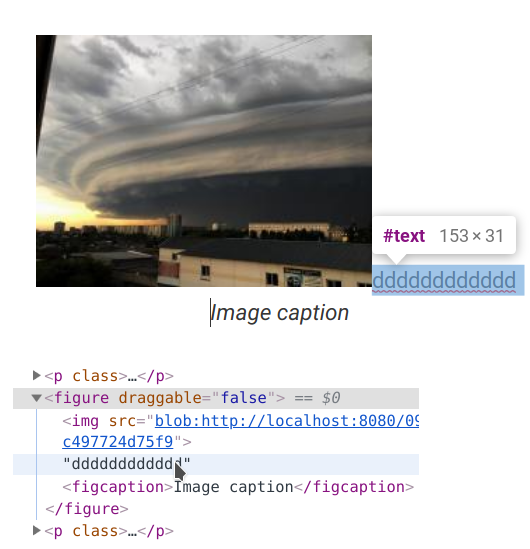
Tried it, but there is some unexpected behaviour. It’s possible to put cursor right after the image and type something. And there is no way to delete it afterwards.
---
### Author:  [@pet](https://discuss.prosemirror.net/u/pet)
#### Post date: [August 4, 2019, 4:30pm UTC](https://discuss.prosemirror.net/t/figure-and-editable-caption/462/9 "2019-08-04T16:30:44Z")
I did this with figcaption decoration that is being inserted once image is selected. Decoration element has also mousedown listener which inserts a figcaption node at that position:
```
wrap_cap = new Slice(Fragment.from(oView.state.schema.nodes.figcaption.create()),0,0)
wrap_pos = figure_node_position + figure_node_size - 1;
oTrans.replace(wrap_pos, wrap_pos, wrap_cap);
```
based on my schema:
```
figure: {
content: "(embed | image*) figcaption{0,1}",
group: "block",
marks: "",
parseDOM: [{tag: "figure"}],
toDOM() {
return ["figure", 0]
}
},
figcaption: {
content: "inline*",
group: "figure",
marks: "strong link",
parseDOM: [{tag: "figcaption"}],
toDOM(node) {
return ["figcaption", 0]
}
}
```

---
### Author:  [@ahwei](https://discuss.prosemirror.net/u/ahwei)
#### Post date: [December 7, 2019, 10:06am UTC](https://discuss.prosemirror.net/t/figure-and-editable-caption/462/10 "2019-12-07T10:06:17Z")
@pet Im struggling to implement this as I still fail to grasp Prosemirror…Would you please share your implementation in a glitch possibly?
---
### Author:  [@pet](https://discuss.prosemirror.net/u/pet)
#### Post date: [December 8, 2019, 4:14pm UTC](https://discuss.prosemirror.net/t/figure-and-editable-caption/462/11 "2019-12-08T16:14:48Z")
@ahwei This is not exactly how I have this feature implemented right now but logic is kind of the same.
> **[Pet Figcaption](https://glitch.com/~pet-figcaption)**
>
> Remixing http://prosemirror.net/examples/basic/ 🎏 Glitch is the friendly community where everyone can discover & create the best apps on the web.
I didn’t bother with details so you might need to review and test…
---
### Author:  [@ahwei](https://discuss.prosemirror.net/u/ahwei)
#### Post date: [December 10, 2019, 1:14am UTC](https://discuss.prosemirror.net/t/figure-and-editable-caption/462/12 "2019-12-10T01:14:31Z")
@pet Thank you sooo much for getting back! 🙇♂️
---
### Author:  [@bhl](https://discuss.prosemirror.net/u/bhl)
#### Post date: [December 10, 2019, 8:12pm UTC](https://discuss.prosemirror.net/t/figure-and-editable-caption/462/13 "2019-12-10T20:12:44Z")
Is there a way to remove the duplicate image in that example when html with a figure element with figurecaption and image are pasted? I’m wondering if this has to do with the figure have two children nodes, so it’s parsed twice. I tried comparing this to marijn’s example, as it doesn’t have the duplicate image, but has that cursor issue instead.
**Edit 1** : Added print statements to the toDom function. It looks like image is parsed 3 times, figurecaption is parsed 2 times, and figure is parsed once.
**Edit 2** : It looks like adding a `contentElement: "figcaption"` to the figure schema helps with this issue. 🙂