# How to: input-like placeholder behavior
**URL:** https://discuss.prosemirror.net/t/how-to-input-like-placeholder-behavior/705
**Category:** Uncategorized
**Created:** [March 23, 2017, 12:19am UTC](https://discuss.prosemirror.net/t/how-to-input-like-placeholder-behavior/705 "2017-03-23T00:19:59Z")
**Posts on this page:** 20
**Page:** 1
### Author:  [@bede](https://discuss.prosemirror.net/u/bede)
#### Post date: [March 23, 2017, 12:19am UTC](https://discuss.prosemirror.net/t/how-to-input-like-placeholder-behavior/705/1 "2017-03-23T00:19:59Z")
Hi there,
Firstly - apologies if this has already been discussed, I’ve seen something _akin_ to it mentioned a few times when hunting around, but nothing that properly discusses it.
I’m currently trying to create an `input` like placeholder behaviour - i.e. text that will be viewable when `textContent === ''` and automatically appears / is removed when that changes. The other important part is that it doesn’t get serialized if I put it through a parser i.e. it’s not actually a part of the ‘content’.
Initially I tried a plugin which just inserted / removed text, but that won’t resolve the parser thing - it also felt a bit clumsy.
Another attempt was creating a `schema` with a ‘placeholder’ node which would exist when nothing else was there. So `doc: { content: '(placeholder | inline<_>+)' }` and have a placeholder which could be an `atom` but that’s an invalid content expression - though I don’t understand why? I could then serialize that to DOM that doesn’t include it by using a schema that doesn’t include placeholders.
Can anyone help me out here, am I on the right track?
Cheers, Bede
---
### Author:  [@rsaccon](https://discuss.prosemirror.net/u/rsaccon)
#### Post date: [March 23, 2017, 2:47am UTC](https://discuss.prosemirror.net/t/how-to-input-like-placeholder-behavior/705/2 "2017-03-23T02:47:21Z")
Just a quick thought on this: you could use custom node views (for the nodes where you wanna show placeholder), and in the `update` method, if content is empty, set the `innerHTML` of an absolute positioned dom node (which is behind the `contentDOM`) to your placeholder value. But I have not tried that myself, so no idea what issues you might run into.
---
### Author:  [@marijn](https://discuss.prosemirror.net/u/marijn)
#### Post date: [March 23, 2017, 8:05am UTC](https://discuss.prosemirror.net/t/how-to-input-like-placeholder-behavior/705/3 "2017-03-23T08:05:48Z")
Here’s a very crude plugin that does that:
```javascript
function placeholderPlugin(text) {
return new Plugin({
props: {
decorations(state) {
let doc = state.doc
if (doc.childCount == 1 && doc.firstChild.isTextblock && doc.firstChild.content.size == 0)
return DecorationSet.create(doc, [Decoration.widget(1, document.createTextNode(text))])
}
}
})
}
```
---
### Author:  [@bede](https://discuss.prosemirror.net/u/bede)
#### Post date: [March 23, 2017, 10:02pm UTC](https://discuss.prosemirror.net/t/how-to-input-like-placeholder-behavior/705/4 "2017-03-23T22:02:28Z")
Ah @marijn perfect! That’s exactly what I was after, thanks!
I also need to be able to add / remove decorations based on if the view is `editable` - I can’t seem to find the best place to change add / remove decoration set when view changes from editable / not editable?
Lastly - when I’m doing this, if you click on the decoration it does focus the editor, but the cursor is hidden, is there a way to fix this?
See:
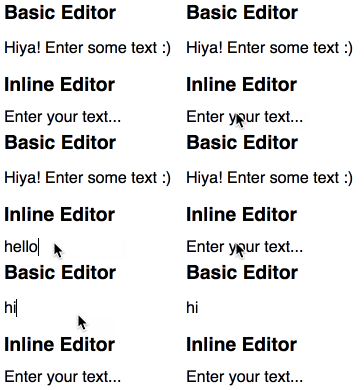
Note that the cursor only appears after I start typing. It’s not a big deal, but it’s just a bit confusing from a UX perspective.
Thanks again!
---
### Author:  [@bede](https://discuss.prosemirror.net/u/bede)
#### Post date: [March 24, 2017, 2:04am UTC](https://discuss.prosemirror.net/t/how-to-input-like-placeholder-behavior/705/5 "2017-03-24T02:04:01Z")
I fixed the first problem - only applying decorations when `view.editable === true` by storing the `view.editable` prop in the state of the placeholder plugin, and then reading that state whenever the decoration might be applied. It feels pretty messy, as it involves sending an empty transaction with plugin meta to tell the plugin the if view is editable or not, but couldn’t figure out another way…
---
### Author:  [@marijn](https://discuss.prosemirror.net/u/marijn)
#### Post date: [March 24, 2017, 7:20am UTC](https://discuss.prosemirror.net/t/how-to-input-like-placeholder-behavior/705/6 "2017-03-24T07:20:04Z")
> [@bede](#):
>
> it involves sending an empty transaction with plugin meta to tell the plugin the if view is editable or not, but couldn’t figure out another way…
Does the editable setting originate from a specific other plugin? If so, you might be able to give the placeholder plugin access to that plugin’s state (by sharing its plugin key).
> [@bede](#):
>
> if you click on the decoration it does focus the editor, but the cursor is hidden, is there a way to fix this?
That’s a browser issue, I guess – cursor drawing around uneditable elements is quite buggy. You could try wrapping the placeholder in an absolutely positioned element, that sometimes works around this bug.
---
### Author:  [@bede](https://discuss.prosemirror.net/u/bede)
#### Post date: [March 24, 2017, 9:51pm UTC](https://discuss.prosemirror.net/t/how-to-input-like-placeholder-behavior/705/7 "2017-03-24T21:51:25Z")
Thanks @marijn
Re: editable, no - the editable behaviour is from a prop function passed in to the main view. But sounds like it’d be best to move it into a plugin and read from that - thanks.
Re: the cursor drawing bug, thanks for the info…one potential workaround could be:
- Create decoration, set widget `contentEditable` to `false` (I believe there’s access to the widget DOM through the decoration `.type.widget` property…?)
- Rather than setting the content on the widget, instead use `::before { content: attr(placeholder); }` and set a placeholder attribute on the widget.
That way, it the user can’t put a selection in the placeholder deco, and given it’s removed as soon as anything is typed, the fact it’s `contenteditable` shouldn’t be a problem.
Anyway - it certainly feels hacky, and not stable, but might work. I’ll have a play and report back here with what I find.
---
### Author:  [@bede](https://discuss.prosemirror.net/u/bede)
#### Post date: [May 26, 2017, 12:53am UTC](https://discuss.prosemirror.net/t/how-to-input-like-placeholder-behavior/705/8 "2017-05-26T00:53:46Z")
So I do have this working as a plugin, and it’s great thanks @marijn for the help.
One bug I was looking for a solution with though: when the plugin returns a decoration, it appears the decoration is added after the view has already rendered, so in my case, it means that the view renders empty - which causes a nasty page reflow for me - and then the placeholder widget is added so it jumps back to proper size.
Has anyone got any idea on how to fix this? Essentially I’m just wanting to delay rendering of the view until the widget is added / add the widget before the view is next rendered.
---
### Author:  [@marijn](https://discuss.prosemirror.net/u/marijn)
#### Post date: [May 26, 2017, 3:19pm UTC](https://discuss.prosemirror.net/t/how-to-input-like-placeholder-behavior/705/9 "2017-05-26T15:19:53Z")
> [@bede](#):
>
> Essentially I’m just wanting to delay rendering of the view until the widget is added / add the widget before the view is next rendered.
In principle the way ProseMirror plugins works should make it impossible to have accidental extra reflows – the `decorations` prop is called _when_ the view is updated, so any decorations it returns are immediately drawn.
---
### Author:  [@johanneswilm](https://discuss.prosemirror.net/u/johanneswilm)
#### Post date: [June 15, 2017, 10:26am UTC](https://discuss.prosemirror.net/t/how-to-input-like-placeholder-behavior/705/10 "2017-06-15T10:26:45Z")
In version 0.10, I used this CSS:
```
div.literal::before {
content: attr(data-placeholder);
color: #cecece;
}
```
And then manually added or removed the `data-placeholder` attribute on focus and blur of the editor adding it whenever bluring if the field was empty, otherwise removing it.
But it seems 0.21 doesn’t like me to do that any more. Running
```
document.querySelector('div.literal').setAttribute('data-placeholder', 'PLACEHOLDER')
```
shows the placeholder for a split-second before removing it again.
Looking at the discussion above, it is not clear to me whether the caret issue has been resolved. From what I can tell, the placeholder is not removed upon focus because the decorations function of the plugin is not called when focusing. It therefore requires me to input at least thing for the placeholder text to be removed.
---
### Author:  [@marijn](https://discuss.prosemirror.net/u/marijn)
#### Post date: [June 15, 2017, 10:41am UTC](https://discuss.prosemirror.net/t/how-to-input-like-placeholder-behavior/705/11 "2017-06-15T10:41:48Z")
No, definitely don’t mess with the content DOM directly. You can hide placeholders by setting them to `display: none` when they have a parent node with the `ProseMirror-focused` class, if that’s what you are trying to do.
---
### Author:  [@johanneswilm](https://discuss.prosemirror.net/u/johanneswilm)
#### Post date: [June 15, 2017, 2:49pm UTC](https://discuss.prosemirror.net/t/how-to-input-like-placeholder-behavior/705/12 "2017-06-15T14:49:08Z")
> [@marijn](#):
>
> You can hide placeholders by setting them to display: none when they have a parent node with the ProseMirror-focused class, if that’s what you are trying to do.
That worked, but then there is a focus issue: If the user clicks on the placeholder, which subsequently is hidden, there is focus on the editor, but no caret. Instead, this combination of the two approaches seems to work ok, at least on Chrome/desktop:
CSS:
```
.ProseMirror:not(.ProseMirror-focused) span.placeholder::before {
color: #cecece;
content: attr(data-placeholder);
cursor: text;
}
```
JS:
```
function placeholderPlugin(text) {
return new Plugin({
props: {
decorations(state) {
let doc = state.doc
if (doc.childCount == 1 && doc.firstChild.isTextblock && doc.firstChild.content.size == 0) {
let placeHolder = document.createElement('span')
placeHolder.classList.add('placeholder')
placeHolder.setAttribute('data-placeholder', text)
return DecorationSet.create(doc, [Decoration.widget(1, placeHolder)])
}
}
}
})
}
```
---
### Author:  [@aeaton](https://discuss.prosemirror.net/u/aeaton)
#### Post date: [November 2, 2017, 2:32pm UTC](https://discuss.prosemirror.net/t/how-to-input-like-placeholder-behavior/705/13 "2017-11-02T14:32:44Z")
Thanks to the examples above I was able to get the following plugin to work nicely:
```auto
import { DecorationSet, Decoration } from 'prosemirror-view'
import { Plugin } from 'prosemirror-state'
export default text => new Plugin({
props: {
decorations (state) {
const doc = state.doc
if (doc.childCount > 1 ||
!doc.firstChild.isTextblock ||
doc.firstChild.content.size > 0) return
const placeHolder = document.createElement('div')
placeHolder.classList.add('placeholder')
placeHolder.textContent = text
return DecorationSet.create(doc, [Decoration.widget(1, placeHolder)])
}
}
})
```
```css
.ProseMirror .placeholder {
color: #aaa;
pointer-events: none;
height: 0;
}
.ProseMirror:focus .placeholder {
display: none;
}
```
---
### Author:  [@mitar](https://discuss.prosemirror.net/u/mitar)
#### Post date: [November 11, 2017, 5:50am UTC](https://discuss.prosemirror.net/t/how-to-input-like-placeholder-behavior/705/14 "2017-11-11T05:50:12Z")
@aeaton: Oho, great job. I was just reading through past discussions and I see that this is often asked, but nothing stable yet exists.
Do you maybe know how this could be adapted so that placeholder would be displayed for one heading block and another for one paragraph block?
---
### Author:  [@aeaton](https://discuss.prosemirror.net/u/aeaton)
#### Post date: [November 11, 2017, 1:59pm UTC](https://discuss.prosemirror.net/t/how-to-input-like-placeholder-behavior/705/15 "2017-11-11T13:59:02Z")
> [@mitar](#):
>
> Do you maybe know how this could be adapted so that placeholder would be displayed for one heading block and another for one paragraph block?
I haven’t yet looked into enforcing certain block types in certain positions of a document, but perhaps this would be part of that - if there’s a way to identify those two blocks then there should be a way to do the same process as above for each one, creating two decorations.
---
### Author:  [@aeaton](https://discuss.prosemirror.net/u/aeaton)
#### Post date: [March 5, 2018, 10:18am UTC](https://discuss.prosemirror.net/t/how-to-input-like-placeholder-behavior/705/16 "2018-03-05T10:18:27Z")
@mitar I’ve found a nice way to do this, using `Decoration.node` to set a class on empty block nodes:
```auto
import { Plugin } from 'prosemirror-state'
import { Decoration, DecorationSet } from 'prosemirror-view'
export default () => {
return new Plugin({
props: {
decorations: state => {
const decorations = []
const decorate = (node, pos) => {
if (node.type.isBlock && node.childCount === 0) {
decorations.push(
Decoration.node(pos, pos + node.nodeSize, {
class: 'empty-node',
})
)
}
}
state.doc.descendants(decorate)
return DecorationSet.create(state.doc, decorations)
},
},
})
}
```
Then using CSS to define the placeholder text for different types of empty blocks:
```css
.ProseMirror .empty-node::before {
position: absolute;
color: #aaa;
cursor: text;
}
.ProseMirror .empty-node:hover::before {
color: #777;
}
.ProseMirror h1.empty-node::before {
content: 'Title';
}
.ProseMirror p.empty-node:first-child::before {
content: 'Contents';
}
```
---
### Author:  [@mitar](https://discuss.prosemirror.net/u/mitar)
#### Post date: [March 5, 2018, 11:02am UTC](https://discuss.prosemirror.net/t/how-to-input-like-placeholder-behavior/705/17 "2018-03-05T11:02:38Z")
This looks pretty simple. I will try it out. Thanks.
---
### Author:  [@bbalban](https://discuss.prosemirror.net/u/bbalban)
#### Post date: [June 29, 2018, 4:47am UTC](https://discuss.prosemirror.net/t/how-to-input-like-placeholder-behavior/705/18 "2018-06-29T04:47:16Z")
This plugin worked for me. Thanks for sharing. The problem I could not solve yet is how to make the placeholder disappear on focus.
Doing this did not work for me: `:not(:focus):before`
Normally this works outside of Prosemirror. I tried the other suggestion, which is adding `:not(.ProseMirror-focused)` to the CSS class. While this works, it is a partial solution. All placeholders disappear when you focus on any part of the editor. The desired behavior is for the placeholder to disappear when the specific dom element is focused. So I don’t have a solution for this.
---
### Author:  [@JCHollett](https://discuss.prosemirror.net/u/JCHollett)
#### Post date: [July 1, 2018, 8:25pm UTC](https://discuss.prosemirror.net/t/how-to-input-like-placeholder-behavior/705/19 "2018-07-01T20:25:37Z")
Coming in with a different angle, If you use a nodeview you can render a class manually and ignore the mutation. That way if you have !node.content.size you can set the class on, or off. Removes need for decorations and whatnot. Thats if you just have some p elements that you want to have placeholders for, you can just use CSS with a placeholder class
---
### Author:  [@TkTech](https://discuss.prosemirror.net/u/TkTech)
#### Post date: [May 23, 2019, 5:00pm UTC](https://discuss.prosemirror.net/t/how-to-input-like-placeholder-behavior/705/20 "2019-05-23T17:00:36Z")
You have access to the EditorState in the decoration callback, which means you have access to the selection. So rather than trying to hide it with CSS, just remove the class.
```
new Plugin({
props: {
decorations: state => {
const decorations = [] as Decoration[];
const decorate = (node: ProseMirrorNode, pos: number) => {
if (node.type.isBlock && node.childCount === 0 && state.selection.$anchor.parent !== node) {
decorations.push(
Decoration.node(pos, pos + node.nodeSize, {
class: "empty-node"
})
)
}
}
state.doc.descendants(decorate)
return DecorationSet.create(state.doc, decorations)
},
},
})
```
Along the same lines, if you want to hide them all if the editor itself is focused, just check `hasFocus`.
[Next page](https://discuss.prosemirror.net/t/how-to-input-like-placeholder-behavior/705.md?page=2)