# Simulate Keypress Event
**URL:** https://discuss.prosemirror.net/t/simulate-keypress-event/2939
**Category:** Uncategorized
**Created:** [June 25, 2020, 8:11am UTC](https://discuss.prosemirror.net/t/simulate-keypress-event/2939 "2020-06-25T08:11:51Z")
**Posts on this page:** 11
**Page:** 1
### Author:  [@Dacurno](https://discuss.prosemirror.net/u/Dacurno)
#### Post date: [June 25, 2020, 8:11am UTC](https://discuss.prosemirror.net/t/simulate-keypress-event/2939/1 "2020-06-25T08:11:52Z")
I am creating Integration Tests for ProseMirror and I would like to simulate typing to confirm a few things. Here is an example of my Mocha code:
```javascript
it('Plugin can Handle Simulated Event', () => {
let value = false
const test = new Plugin({
props: {
handleDOMEvents: {
keydown (view, event) {
value = true
console.log(view, event)
}
}
}
})
tempEditor({ plugins: [test] })
const editor = $('.ProseMirror')
editor.focus()
// Issue is Here
editor.keydown( function(e) { console.log(e)})
const e = $.Event('keydown')
e.which = 66 // B
editor.trigger(e)
value.should.equal(true)
})
```
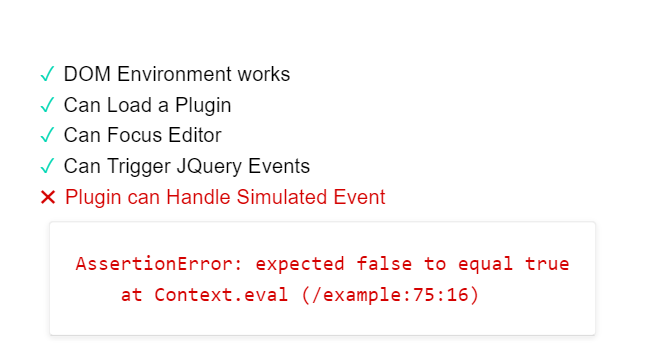
When I run this code, the editor is focused but the editor doesn’t seem to recognize the keydown event and the test fails as the keydown event is never handled by the plugin. I know the event fires because the event is printed by the jquery listener.
---
### Author:  [@marijn](https://discuss.prosemirror.net/u/marijn)
#### Post date: [June 25, 2020, 8:35am UTC](https://discuss.prosemirror.net/t/simulate-keypress-event/2939/2 "2020-06-25T08:35:52Z")
I’m not familiar enough with jQuery to see what might be going on here, but it’s possible that some aspect of the simulated event causes ProseMirror to ignore it (see for example `eventBelongsToView` in the view code).
---
### Author:  [@Dacurno](https://discuss.prosemirror.net/u/Dacurno)
#### Post date: [June 25, 2020, 8:57pm UTC](https://discuss.prosemirror.net/t/simulate-keypress-event/2939/3 "2020-06-25T20:57:29Z")
It seems JQuery wasn’t supported in my test environment for some reason. So I switched to vanilla events and it worked! I am now having another issue with actually adding text through the keypress event. 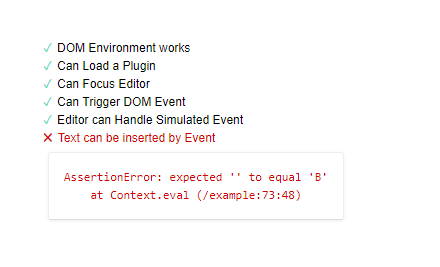
The code I wrote is this:
```javascript
it('Text can be inserted by Event', () => {
const view = tempEditor({ handleKeyDown: (_view, event) => console.log(event) })
const editor = document.querySelector('.ProseMirror')
const event = new KeyboardEvent('keydown', { keyCode: 66, bubbles: false })
editor.dispatchEvent(event)
view.state.doc.firstChild.textContent.should.equal('B')
})
```
---
### Author:  [@marijn](https://discuss.prosemirror.net/u/marijn)
#### Post date: [June 26, 2020, 11:42am UTC](https://discuss.prosemirror.net/t/simulate-keypress-event/2939/4 "2020-06-26T11:42:38Z")
The keypress event isn’t handled and won’t insert text. ProseMirror looks for actual text input into its editable element, which you can’t simulate by firing events.
---
### Author:  [@ocavue](https://discuss.prosemirror.net/u/ocavue)
#### Post date: [November 7, 2021, 12:50am UTC](https://discuss.prosemirror.net/t/simulate-keypress-event/2939/5 "2021-11-07T00:50:06Z")
Can I simulate some special keys like `Enter`, `Backspace`, and `Delete` keypress event by firing events? Based on what I saw [here](https://github.com/ProseMirror/prosemirror-view/blob/b57ba7716918de26b17d2550f99b4041b1bcee5b/test/test-domchange.js#L101-L111), seems like the answer would be “no”, but I just want to make sure.
---
### Author:  [@philippkuehn](https://discuss.prosemirror.net/u/philippkuehn)
#### Post date: [November 7, 2021, 6:31am UTC](https://discuss.prosemirror.net/t/simulate-keypress-event/2939/6 "2021-11-07T06:31:55Z")
You can do this:
```auto
const event = new KeyboardEvent('keydown', {
key: 'Enter',
})
view.someProp('handleKeyDown', f => f(view, event))
```
But keep in mind that this will only work for shortcuts registered by ProseMirror. This doesn’t work for arrow keys (handled by the browser) for example. But in your case `Enter` , `Backspace` , and `Delete` should work.
---
### Author:  [@ocavue](https://discuss.prosemirror.net/u/ocavue)
#### Post date: [November 8, 2021, 12:36pm UTC](https://discuss.prosemirror.net/t/simulate-keypress-event/2939/7 "2021-11-08T12:36:08Z")
@philippkuehn Thanks for your reply. I’m trying to use Jest (JSDOM) to test some keypress events, and your method does work for a registered shortcut. But if the cursor is empty and surrounded by some plain text, the `Backspace` key won’t trigger any shortcut, so I can’t test this case.
```auto
it('can handle Backspace', () => {
const event = new KeyboardEvent('keydown', {key: 'Backspace'})
// select CD
editor.add(
doc(h1('title'), bulletList(listItem(p('ABCD'))), p()), //
)
// press Backspace should delete CD (this works 😊)
editor.view.someProp('handleKeyDown', (f) => f(editor.view, event))
expect(editor.doc).toEqualProsemirrorNode(
doc(h1('title'), bulletList(listItem(p('AB'))), p()),
)
// press Backspace should delete B (this doesn't work 😢)
editor.view.someProp('handleKeyDown', (f) => f(editor.view, event))
expect(editor.doc).toEqualProsemirrorNode(
doc(h1('title'), bulletList(listItem(p('A'))), p()),
)
})
```
Maybe using Cypress/Playwright is a doable solution for my case.
---
### Author:  [@philippkuehn](https://discuss.prosemirror.net/u/philippkuehn)
#### Post date: [November 8, 2021, 1:27pm UTC](https://discuss.prosemirror.net/t/simulate-keypress-event/2939/8 "2021-11-08T13:27:39Z")
Yes it will fail in these cases where no ProseMirror commands hook in. We are using Cypress (with the plan to switch to Playwright) which works great 👍
---
### Author:  [@nbaschez](https://discuss.prosemirror.net/u/nbaschez)
#### Post date: [December 22, 2022, 10:58pm UTC](https://discuss.prosemirror.net/t/simulate-keypress-event/2939/9 "2022-12-22T22:58:32Z")
Hey! I’m also trying to simulate typing. My use case is I have plain text streaming from an external API and I want to have formatting rules apply (e.g. `--` should turn into an em dash, 1. should turn into a numbered list, etc.)
I tried inserting one character at a time using TipTap’s `insertContent` function, but it doesn’t trigger input rules. So then I tried simulating a keypress event, but `view.dom.dispatchEvent(event)` doesn’t work at all, and `view.someProp('handleKeyDown', f => f(e.view, event)` only works if `event.key == 'Enter'`.
Any tips on how I should approach this? Thanks!
---
### Author:  [@marijn](https://discuss.prosemirror.net/u/marijn)
#### Post date: [December 23, 2022, 9:10am UTC](https://discuss.prosemirror.net/t/simulate-keypress-event/2939/10 "2022-12-23T09:10:52Z")
`dispatchEvent` does not cause an event’s native behavior to happen, it just allows event handlers to react to it. A solution for this would have to manually first fire the keyboard event (to allow keymaps to handle it), if that isn’t prevent-defaulted use `someProp` to run potential input handler, and then if none handle it use `replaceSelection` to actually insert the text, I guess.
---
### Author:  [@nbaschez](https://discuss.prosemirror.net/u/nbaschez)
#### Post date: [December 23, 2022, 11:25pm UTC](https://discuss.prosemirror.net/t/simulate-keypress-event/2939/11 "2022-12-23T23:25:26Z")
Thank you!