# Trigger keyboard events with pure js
**URL:** https://discuss.prosemirror.net/t/trigger-keyboard-events-with-pure-js/5076
**Category:** Uncategorized
**Created:** [December 3, 2022, 8:21pm UTC](https://discuss.prosemirror.net/t/trigger-keyboard-events-with-pure-js/5076 "2022-12-03T20:21:07Z")
**Posts on this page:** 6
**Page:** 1
### Author:  [@ugurkellecioglu](https://discuss.prosemirror.net/u/ugurkellecioglu)
#### Post date: [December 3, 2022, 8:21pm UTC](https://discuss.prosemirror.net/t/trigger-keyboard-events-with-pure-js/5076/1 "2022-12-03T20:21:08Z")
Hi there!
I am implementing a chrome extension which fills a form basically.
This form has ProseMirror rich text editor in it.
I want to trigger Ctrl+V on the text editor, but I couldn’t find any solution to this. these are the things I’ve tried so far:
document.querySelector(‘#ELEMENT\_ID’) and change its innerText, value etc.
el.dispatchEvent(new KeyboardEvent(“keydown”, { key: “V”, ctrlKey: true})) didn’t work either… (I was hopeful about it)
el.dispatchEvent(new KeyboardEvent(“keydown”, { key: “Enter” })) works by the way.
I was able to add some text with el.focus() document.execCommand(‘insertText’, false, “someText”) el.dispatchEvent(new Event(“change”, { bubbles: true }))
But I actually need to paste an image and a table into the editor 😕
Do you know how to trigger this with pure js and dom manipulation?
---
### Author:  [@bZichett](https://discuss.prosemirror.net/u/bZichett)
#### Post date: [December 3, 2022, 9:19pm UTC](https://discuss.prosemirror.net/t/trigger-keyboard-events-with-pure-js/5076/2 "2022-12-03T21:19:44Z")
For my unit tests `view.dom.dispatchEvent(new Event(...))` (here view is the prosemirror view instance) works for me for cut / copy / paste simulation (havent ever needed to dispatch keydown events yet).
> But I actually need to paste an image and a table into the editor 😕
So you should be able to use dispatchEvent for dispatching a paste event after setting the correct clipboard transfer ([Clipboard API - Web APIs | MDN](https://developer.mozilla.org/en-US/docs/Web/API/Clipboard_API)) in the context of your chrome extension. This much should work as explained above 👍
It appears like using keydown events with V / ctrlKey is just not the right approach considering the above API exists.
Let me know if you have any questions / concerns about clipboard transfer API.
---
### Author:  [@ugurkellecioglu](https://discuss.prosemirror.net/u/ugurkellecioglu)
#### Post date: [December 3, 2022, 9:38pm UTC](https://discuss.prosemirror.net/t/trigger-keyboard-events-with-pure-js/5076/3 "2022-12-03T21:38:21Z")
Thanks for the reply!
Unfortunately, I don’t have access to prosemirror instance. App is made with react, maybe I would reach the component If it is made with vue ( via this.VueInstance, but I am not sure.)
```auto
navigator.clipboard
.readText()
.then(
(clipText) => (document.querySelector(".editor").innerText += clipText)
);
```
tried it with an table in my clipboard, it pasted them as text,
if I do that manually, editor formats it and show a pretty table to me 🙂
didn’t work on images too
---
### Author:  [@bZichett](https://discuss.prosemirror.net/u/bZichett)
#### Post date: [December 4, 2022, 1:47am UTC](https://discuss.prosemirror.net/t/trigger-keyboard-events-with-pure-js/5076/4 "2022-12-04T01:47:55Z")
You actually dont need the direct instance to apply the clipboard type event (paste). Try it out from the extension with query selector and let me know what happens.
It supports blobs (images but could also just take in an img html string if you wanted that instead) And this might be the only way you might be able to move forward to support what you need. The first step though is still the `navigator.clipboard.*` setting of data (html, plain or other types) like you are doing above but the way you are adding to `innerText` is likely going to conflict with prosemirror handling.
---
### Author:  [@ugurkellecioglu](https://discuss.prosemirror.net/u/ugurkellecioglu)
#### Post date: [December 4, 2022, 6:56am UTC](https://discuss.prosemirror.net/t/trigger-keyboard-events-with-pure-js/5076/5 "2022-12-04T06:56:09Z")
Maybe I do something wrong but couldn’t solve this with navigator either.
this is my selected element
> let el = document.querySelector(‘[contenteditable=“true”]’)
```auto
let appendImage = async () => {
const item_list = await navigator.clipboard.read() // get data
let image_type // we will feed this later
const item = item_list.find(
(
item // choose the one item holding our image
) =>
item.types.some((type) => {
// does this item have our type
if (type.startsWith("image/")) {
image_type = type // store which kind of image type it is
return true
}
})
)
const file = item && (await item.getType(image_type))
el.focus()
document.execCommand("insertHTML", false, file)
document.execCommand("paste", false, file)
el.dispatchEvent(new KeyboardEvent("keydown", { key: "Enter" })) // press enter
}
```
but it doesn’t affect at all
```auto
navigator.clipboard.readText().then((clipText) => {
document.querySelector('[aria-label="Main content area"]').focus()
document.execCommand("insertText", false, clipText)
})
```
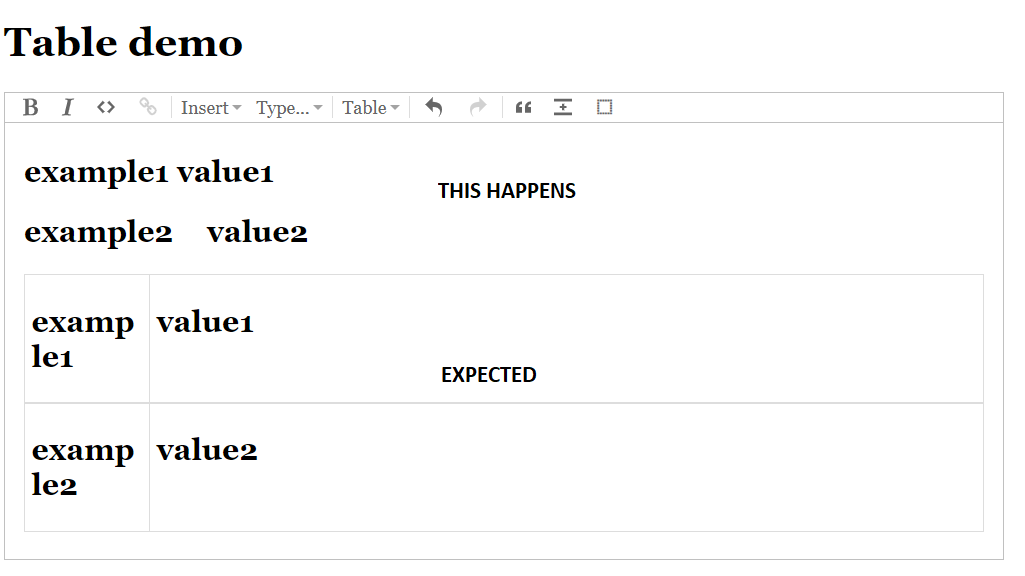
I tried this code snippet to paste a table, but it pastes as plain text, editor doesn’t convert it to a pretty table
* * *
I used this example for testing: [Table demo (prosemirror-tables.netlify.app)](https://prosemirror-tables.netlify.app/)
```auto
window.addEventListener("load", function () {
document.querySelector('[contenteditable="true"]').focus()
navigator.clipboard.readText().then((clipText) => {
// document.querySelector('[contenteditable="true"]').innerText = clipText
// document.querySelector('[contenteditable="true"]').innerHTML = clipText
this.document.execCommand("insertText", false, clipText)
})
})
```
didn’t work.
---
### Author:  [@bZichett](https://discuss.prosemirror.net/u/bZichett)
#### Post date: [December 4, 2022, 9:28pm UTC](https://discuss.prosemirror.net/t/trigger-keyboard-events-with-pure-js/5076/6 "2022-12-04T21:28:43Z")
Try using `clipboardData` and set its data transfer object with at least html.
> **[ClipboardEvent.clipboardData - Web APIs | MDN](https://developer.mozilla.org/en-US/docs/Web/API/ClipboardEvent/clipboardData)**
>
> The ClipboardEvent.clipboardData property holds a DataTransfer object, which can be used:
> **[DataTransfer.setData() - Web APIs | MDN](https://developer.mozilla.org/en-US/docs/Web/API/DataTransfer/setData)**
>
> The DataTransfer.setData() method sets the drag
> operation's drag data to the specified data and type. If
> data for the given type does not exist, it is added at the end of the drag data store,
> such that the last item in the types list will be
> ...