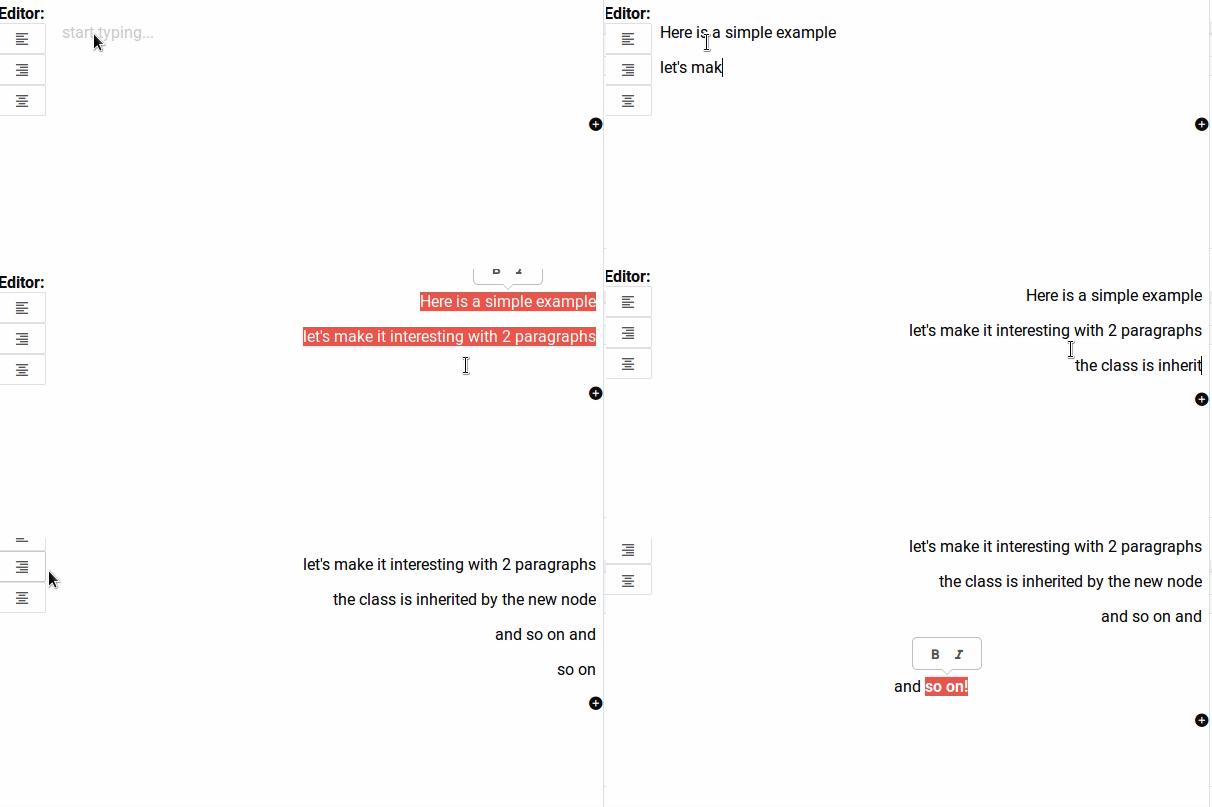
Since I’d seen a number of text-alignment posts - and that a number of people had been wrestling to get what they wanted out of it (me included, this took me hours to figure out) - I thought I’d share my solution.
specification
Effectively, I wanted the option to align text left/right/centre/justify using attribute classes and to have the enter key assign the class on to the next node in turn.
The work that needs to take place has 3 parts:
- setting up the schema attributes
- setting up the button command
- setting up the keymap behaviour for when the user presses
Enter(I replicate prose-mirror’sbaseKeymap, but override its ‘Enter’ keysplitBlockcommand).
I’m going to demonstrate with the paragraph node; you may also need to set up schema attributes on other nodes depending on how you want your editor to split stuff like headers etc.
(note Because I use classes to specify alignment, you will need CSS in your implementation that sets text-alignment: left/right/etc. for .pm-align--left/.pm-align--right/etc. without said CSS you’ll just get a bunch of tags with classes.)
1. schema attributes
amend your schema’s paragraph definition to contain attrs.class.default and toDOM as below.
paragraph: {
            group: 'block',
            attrs: {
              class: {
                default: 'pm-align--left'
              }
            },
            content: 'inline*',
            toDOM (node) {
              return ['p', { class: node.attrs.class }, 0]
            },
            parseDOM: [{
              tag: 'p',
              getAttrs: node => {
                return {
                  textAlign: node.attributes
                    ? node.attributes.class
                    : node.attrs.class
                }
              }
            }]
          }
2. commands
I’m writing a Vue implementation so I wont show how to bind the command to a button since my methods are probably different to yours. What I will show you is the command. I actually handle the command in 2 parts (I have a helper class). I iterate through the selected nodes because I want the user to be able to select multiple nodes and align them at once (I may refactor this logic as I wrote it a while back and I think I can probably use something better); anyhow, here is the method that does the heavy lifting
import { setBlockType } from 'prosemirror-commands'
import { Helper } from '../Helper.js'

export function setSelectedNodeClasses (className, state, view) {
  const helper = Helper({ state })
  const commands = []
  helper.findNodeBySelection(
    (node) => {
      if (!commands.filter(({type}) => type === node.type.name).length) {
        commands.push({
          command:
            setBlockType(
              node.type,
              { class: className, isBeingAligned: true })
        })
      }
    })
  commands.forEach(({command}) => command(view.state, view.dispatch))
}
… and here is a stub of the Helper class that it calls (again, probably could be replaced with an existing prosemirror method, but - brother - there’s a lot to this tool chain!)
I actually use Stampit to manage my objects, but here I’m using a plain old JS function factory:
export const Helper = function ({state}) {
  return {
    findNodeBySelection (callback, _state) {
      if (_state || this.state) {
        const state = _state || this.state
        let { from, to, fromFound, toFound } = this.getSelectionObject(state)
        const priorNodes = []
        state.doc.descendants((node) => {
          if (node.isBlock && (node === from || (fromFound && !toFound))) {
            callback(node, priorNodes, { from, to })
            fromFound = true
          } else if (node.isBlock && !fromFound) { priorNodes.push(node) }
          toFound = toFound || (from === to || node === to)
        })
      }
    }
  }
}
In synopsis, the helper just fires a callback on all nodes within the bounds of the user’s current selection.
3. keymap
I’m operating on the assumption that you use baseKeymap. Obviously, you can configure the chainCommand in the example below to your needs.
// imports required to perform the "Enter command"
import {
  chainCommands,
  baseKeymap,
  newlineInCode,
  createParagraphNear,
  liftEmptyBlock
}
import ...
import ... etc.

// here is the customSplitBlock method.  This is effectively a copy of prose-mirror's own default splitBlock; I flag the changes with the comments marked "HERE" below.  You may wish to decouple this logic as it's a pretty hefty function!
function customSplitBlock (state, dispatch) {
      const { $from, $to } = state.selection
      if (state.selection instanceof NodeSelection && state.selection.node.isBlock) {
        if (!$from.parentOffset || !canSplit(state.doc, $from.pos)) return false
        if (dispatch) dispatch(state.tr.split($from.pos).scrollIntoView())
        return true
      }

      if (!$from.parent.isBlock) return false

      if (dispatch) {
        let atEnd = $to.parentOffset === $to.parent.content.size
        let tr = state.tr
        if (state.selection instanceof TextSelection) tr.deleteSelection()
        let deflt = $from.depth === 0 ? null : $from.node(-1).contentMatchAt($from.indexAfter(-1)).defaultType
        // HERE: I assign the class from the $from.node's class
        let types = atEnd && deflt ? [{ type: deflt, attrs: { class: $from.node().attrs.class } }] : null
        let can = canSplit(tr.doc, $from.pos, 1, types)
        if (!types && !can && canSplit(tr.doc, tr.mapping.map($from.pos), 1, deflt && [{ type: deflt }])) {
        // HERE: I assign the class from the $from.node's class again (either way, I want the inheritance)
          types = [{ type: deflt, attrs: { class: $from.node().attrs.class } }]
          can = true
        }
        if (can) {
          tr.split(tr.mapping.map($from.pos), 1, types)
          if (
            !$from.parentOffset &&
            $from.parent.type !== deflt &&
            $from.node(-1).canReplace(
              $from.index(-1),
              $from.indexAfter(-1),
              Fragment.from(deflt.create(), $from.parent))) {
            tr.setNodeMarkup(tr.mapping.map($from.before()), deflt)
          }
        }
        dispatch(tr.scrollIntoView())
      }
      return true
    }

// add the customSplitBlock to a custom keymap call in your EditorState.create()
EditorState.create({
      doc: DOMParser.fromSchema(schema).parse(ed.doc),
      plugins:       plugins: [
        ...
        keymap({
          'Enter': chainCommands(
            newlineInCode,
            createParagraphNear,
            liftEmptyBlock,
            customSplitBlock // our new implementation goes here.
          ),
         ... // your other custom keymap properties
        }),
        keymap(baseKeymap) // baseKeymap must go AFTER the 'Enter' definition above
        ...
      ]
    })
I hope the above is useful to someone  happy coding