Hi everyone,
I’d like to share QuireKit, an open-source (MIT) editor framework. Its main line is built on ProseMirror: it keeps the model, state, transforms, commands, history, input rules, keymap and collab, and offers several views on top of the same editor state.
- Website and live demos: https://quirekit.com
- Code: GitHub - quirekit/quirekit · GitHub
- Docs: https://docs.quirekit.com
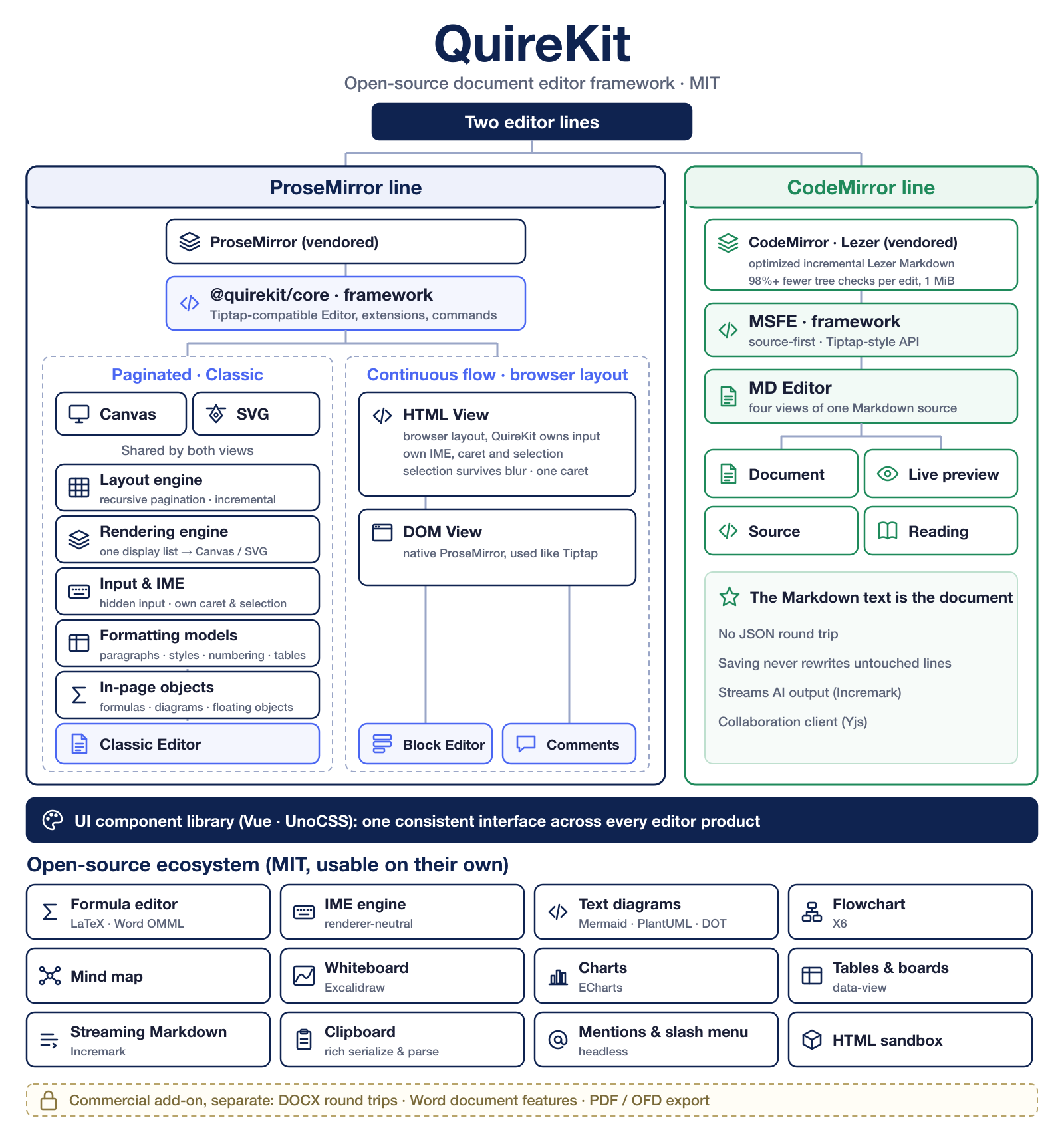
There are two editor lines. The ProseMirror line is the one this post is about; the CodeMirror line is summarized at the end.
Core API
@quirekit/core is the editor framework of this line: it provides a Tiptap-compatible Editor, extension and command API, with the ProseMirror APIs available underneath. Extensions, commands and plugins are shared by every view below. The goal is that a Tiptap extension ports mainly by switching its @tiptap/core imports to @quirekit/core.
1. Classic: real pagination on Canvas / SVG
QuireKit lays out the document itself instead of letting the browser do it.
- Pagination is one recursive routine for every container: the body, paragraphs (split by line), tables (split by row) and table cells, which are containers paginated by the same routine. The parent owns page breaks; a child reports whether it fit, overflowed or needs a new page, plus the state needed to continue on the next page (open marks, list counters, repeated header rows).
- Layout is incremental, and only visible pages are kept as surfaces.
- Formatting models for paragraphs, styles with inheritance, multi-level numbering and tables are open source too, as are in-page objects: formulas, flowcharts, mind maps, whiteboards and floating objects laid out on the page.
- The layout engine doesn’t know what the content means. Paragraph, page and table semantics are injected through document profiles, so the same engine can lay out a plain document or a Word-shaped one.
- Layout produces one neutral display list, drawn to Canvas 2D or SVG. Hit testing, caret and selection geometry come from the same layout.
- Input goes through a hidden input proxy placed at the caret. Keyboard, clipboard and IME events become ordinary transactions.
- IME preedit text is laid out from a speculative state that is never dispatched: composition shows inline, but history and collab don’t change until
compositionend. Decorations are computed against that same speculative state, so they stay on the right glyphs while composing. The IME state machine is a separate, renderer-neutral package (@quirekit/ime).
2. view-html: continuous flow, with QuireKit owning the caret and selection
The browser lays out the document as normal HTML (this is what the block editor uses), but QuireKit owns input, the caret and the selection. It exists for problems that keep coming back with contenteditable:
- The native selection belongs to the focused element. When the user clicks into a toolbar field or a popover input (a link URL, a color, a search box), the highlight goes grey or disappears, exactly when they’re about to act on it.
- The usual workaround is to paint a fake selection or caret while the editor is blurred. Then you have a fake caret and the real one, and keeping the two in sync through blinking, IME composition and focus changes is a steady source of bugs.
- view-html draws a single caret and the selection from model geometry, independent of focus, and suppresses the native one. Text selections, table-cell selections and select-all are painted the same way.
- Input goes through the same hidden proxy and IME engine as the Canvas/SVG views, so typing behaves the same in both.
- Block handles and menus are positioned from the same geometry.
3. dom-view: native ProseMirror
@quirekit/dom-view mounts ProseMirror’s own EditorView (contenteditable). Used this way, QuireKit works much like Tiptap. It’s meant for lightweight inputs such as comments and chat, sharing the same extensions and commands.
About the ProseMirror packages
QuireKit ships vendored copies of the ProseMirror packages as @quirekit/pm-*, with import paths renamed and the upstream MIT license and attribution kept, so the whole stack resolves to a single package identity.
The CodeMirror line, briefly
Built on vendored CodeMirror and Lezer. Our Lezer Markdown parser adds reuse proofs to incremental parsing, so after an edit the editor can skip unchanged syntax regions instead of re-walking the tree; on a 1 MiB document this cuts tree comparisons per edit by over 98%. MSFE is the editor framework of this line: source-first, with Tiptap-style extensions and commands, where the Markdown text itself is the document. MD Editor is built on it and offers four views of one Markdown source: document, live preview, source and reading. Docs and demos: https://msfe.quirekit.com
Open-source ecosystem
These are MIT packages that work on their own, outside the editors:
- Formula editor: structural editing with strict LaTeX output, and LaTeX ↔ Word OMML conversion (
math,math-ui,math-omml) - IME engine: renderer-neutral composition state machine, usable by any non-contenteditable view (
ime) - Text diagrams: Mermaid, PlantUML and Graphviz with live preview (
text-diagram-editor) · https://text-diagram.quirekit.com - Flowchart, mind map and whiteboard editors (
flow-editor,mind-editor,whiteboard-editor) - Charts and tables/boards over portable datasets (
chart,data-view) - Streaming Markdown rendering for AI output (
incremark,incremark-react) · https://markdown.quirekit.com - Headless @-mention and slash-menu controller (
suggestion) - A UI component library (Vue, UnoCSS) that every editor product is built with, so the Classic, block and Markdown editors share one consistent interface (
ui) · https://design.quirekit.com
Licensing
Everything in the repository is MIT, including the layout engine and all views. Word compatibility (DOCX round trips, Word document features, PDF/OFD export) is a separate commercial add-on and isn’t needed to use the editor.
It’s an early alpha. Feedback is welcome, especially from people who have worked on non-DOM views or fought contenteditable selection: input handling, IME, and how decorations and node views should map onto these views.
Thanks!